The demo is the complete three-plugin system. Original and Sum pause briefly; Send plays a short reminder noise. Offline renders stay silent until licensed.
Downloads / DeepPerfection
Additive Phase Restoration

DeepPerfection

Additive frequency-domain restoration, not time-domain gain control.

Try every control with no account or card. The demo briefly pauses playback until licensed. Ready to keep it running? Buy DeepPerfection · $49.99
Secure checkout via Shopify · 14-day refund if it's not for you
Independent review
“A genuinely novel, well-priced utility that does something most tools do not attempt. The idea works.”
Marty G · Audioblob · 4.5/5 · provisional reviewRead the full review ↗
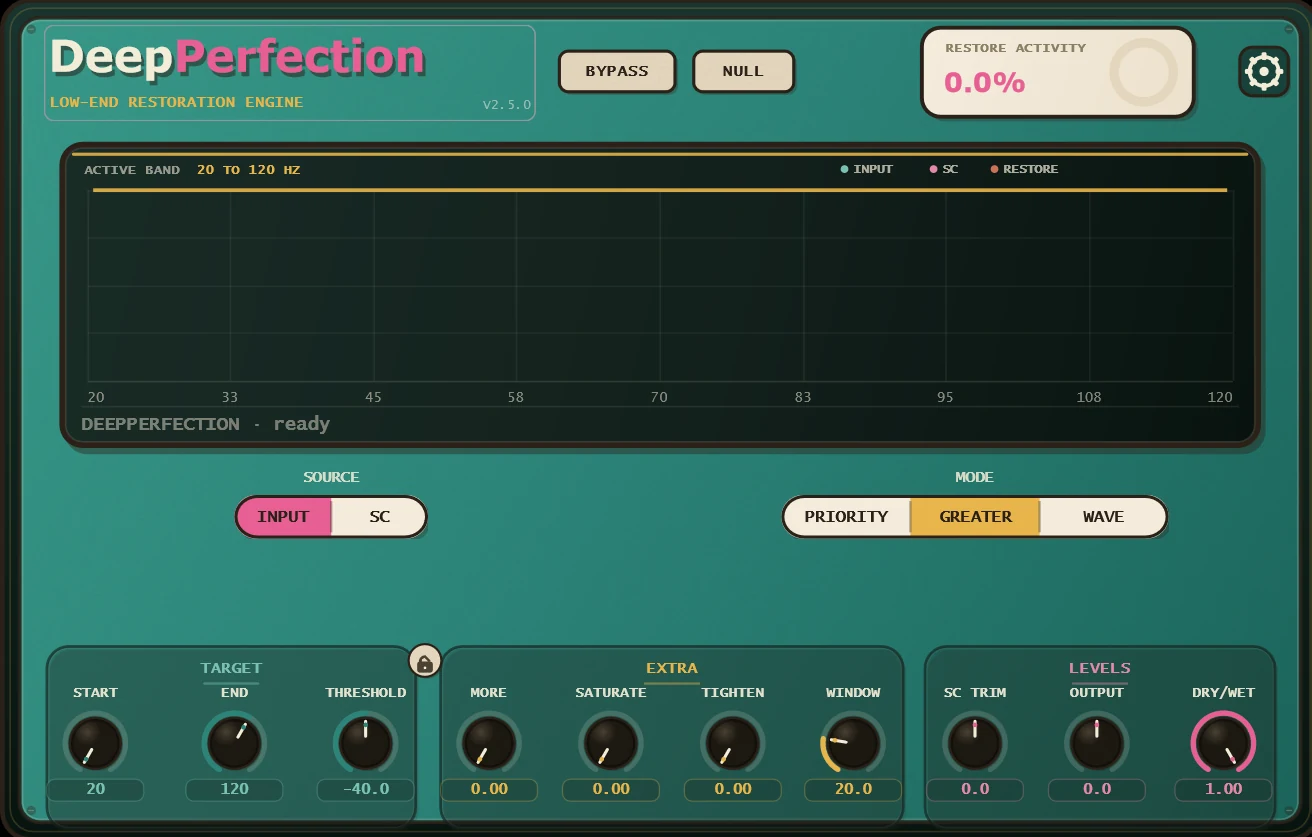
DeepPerfection plugin interface, analyzer with priority, behavior and dry/wet knobs
The full interface · analyzer + 7 controls
Hear it

Five stems from one session.

Switch between the raw mix, the corrected mix, the null (what it added), and the isolated drums and instruments. Same gain, same everything, just phase fixed. Good headphones or speakers required.

Source material
0:00 / 0:00
Without DeepPerfection · hear the full track ↗
Heard the difference?Put DeepPerfection on your own session. The demo is the whole plugin, with no account and no card.
Set it up in your DAW

From download to working session in about a minute.

Choose the path that matches your session. MultiTrack avoids host sidechain limits; the original is fastest for one kick and one bass.

Recommended

MultiTrack

Three or more low-end sources

  1. 1
    Add the Sends. Put DeepPerfection MultiTrack Send late on every kick, bass, sub, or 808 track. Give each source a unique Priority; Priority 1 matters most.
  2. 2
    Create the Sum track. Put DeepPerfection MultiTrack Sum alone on an empty return, aux, FX, or mixer track. Feed no audio into it and route its output to your master.
  3. 3
    Play and blend. The Sum outputs corrective fill only. Raise that track until the low end locks, then compare with Bypass or Null.
  4. +
    Optional calibration. Add another Send to the mix bus, choose Master Reference, then match each Sum Trim to its red mark while playing with Null off.
Classic

Original sidechain

One kick and one bass

  1. 1
    Insert DeepPerfection on the kick. Use the original plugin, not MultiTrack Send or Sum.
  2. 2
    Choose the bass as its sidechain. Use your DAW's sidechain or key-input selector. Leave the bass routed to the master as usual.
  3. 3
    Start neutral. Set Threshold near −18 dB, Target End to 120–150 Hz, and Dry/Wet to 100%.
  4. 4
    Raise More until it locks. Use Bypass to judge the restored sum and Null to hear only what DeepPerfection adds.
What is an “empty return or aux” called in my DAW?
Ableton LiveReturn TrackLogic ProAux channel stripPro ToolsStereo Aux InputFL StudioEmpty Mixer InsertREAPEREmpty trackCubase / NuendoFX ChannelStudio OneFX Channel

The name changes, but the rule does not: Sum sits alone, receives no track input, and routes its fill to the main output.

What it actually does

It adds back what phase cancellation removes.

A kick and a bass both live in the sub frequencies. Down there their waveforms overlap, and wherever they oppose, they cancel. That energy doesn't move somewhere else; it's just gone. Your low end thins out and nothing on the channel strip explains why.

Put a MultiTrack Send on every low-end track, or any track with meaningful low-end content. Place each Send as late in the chain as your DAW allows and give every source a unique Priority, with the most important element at Priority 1. Put MultiTrack Sum alone on an empty return or aux track, never on the master and with nothing feeding its input. An optional Master Reference Send on the mix bus unlocks the Sum's red trim targets.

DeepPerfection is additive frequency-domain restoration. It measures where the sources' frequency-and-phase interaction removes energy, then synthesizes only the missing fill. A ducker makes a time-domain gain decision, turning one source down with an attack-and-release envelope to create a pocket. DeepPerfection turns neither source down and creates no pocket. The sidechain is only how it receives the second signal for analysis. Use a ducker or spacer alongside it when your mix also needs masking control or separation.

Additive restoration, not ducking

Frequency and phase, not a gain envelope.

A ducker turns a source down over time. DeepPerfection turns neither source down; it measures what their interaction removes and adds that energy back.

01

Two sources share the lows

A kick and a bass both live in the sub frequencies. Down there their waveforms overlap and interact, that's a phase relationship.

02

The overlap cancels

Where the two waves oppose, their combined amplitude falls. The low end can thin out even when each source sounds strong in solo.

03

It adds back what's lost

DeepPerfection uses the second source as an analysis reference. It synthesizes fill only where the frequency-and-phase interaction removed energy. No source is turned down, and no attack-and-release pocket is carved.

The sidechain is an input, not a processing category. Use a ducker or spacer alongside DeepPerfection when you also want separation; use DeepPerfection to restore energy lost to cancellation.

Every knob, in plain language

The interface, explained.

Nothing here is a black box. This is the whole panel. Here's what each control is for.

Analyzer + Restore %

See the collision

The spectrum shows your signal, the sidechain, and exactly where they fight. “Restore %” reads how much low end is being rebuilt right now.

Priority · Input / Sidechain

Threshold

Sets how much cancellation has to be present before it acts, and whether it listens to the track or the sidechain source first.

Cutoff

Where it works

Focuses the repair on the frequency range that actually matters. Keep it on the lows, or open it up.

More / Tighten

How hard, how tight

More pushes the amount of restoration; Tighten controls how surgically it tracks the collision versus letting it breathe.

Saturate · Priority

Glue the rebuild in

Adds harmonic weight so the restored energy sits with the original instead of sounding bolted on.

Behavior · Greater

Level & Dry/Wet

Level trims the output; Dry/Wet blends the correction against the untouched signal. Null compares the two instantly.

Formats
VST3 · AU · CLAP · AAX
Systems
Windows · macOS · Linux
Version
2.5.1
Price
$49.99 · free demo
Questions

DeepPerfection, answered.

What formats and systems does DeepPerfection support?

Windows ships VST3, CLAP and AAX. macOS ships VST3, AU, CLAP and AAX. Linux ships VST3 and CLAP.

Is DeepPerfection a sidechain ducker?

No. “Sidechain” describes how the plugin receives its second signal, not what it does to that signal. A ducker uses a time-domain gain envelope to turn one source down. DeepPerfection analyzes frequency-and-phase interaction and additively synthesizes the missing energy; neither source is turned down. Use both when your mix has both cancellation and masking.

How do I set up MultiTrack mode?

Place a MultiTrack Send late on every track with meaningful low-end content and give each one a unique Priority. Put MultiTrack Sum alone on an empty return or aux track with nothing feeding its input, then play and raise that return to blend in the fill. For optional calibration, put another Send on the mix bus, choose Master Reference, and match the Sum Trims to their red marks while playing with Null off.

Is the free demo limited?

The processing and controls are complete. DeepPerfection and MultiTrack Sum mute for 5 seconds every 45 seconds, MultiTrack Send plays a short noise burst every 30 seconds, and offline bounces, exports and freezes render silent until licensed. No account or card is required.

Bring back the low end that's thinning out right now.

The whole plugin, free. Most people who buy decide within a day of installing, because they can hear it.

VST3 · AU · CLAP · AAX · no account, no card · all downloads